
How to book an appointment online with Bronjoy
Bronjoy is a catalogue of salons, clinics, studios and services across Uzbekistan with online booking. Booking is free for clients. You don't need to sign up first: your account is created when you confirm your first booking.
1. Find a place
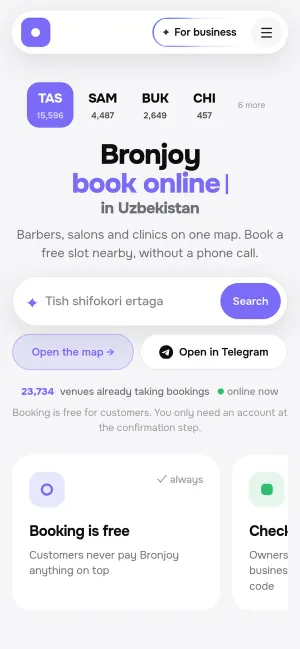
- Open bronjoy.com.
- Pick your city at the top: TAS is Tashkent, SAM is Samarkand, and so on.
- Type a service or a name into search, for example "manicure" or "dentist", and tap Search.
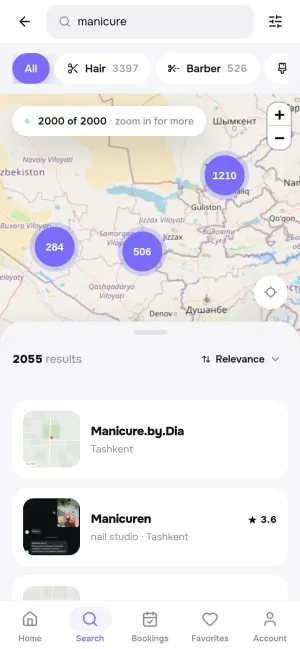
Results show a map and a list. Categories (Hair, Barber, Nails and more) sit above the map. Filters and sorting are behind the button next to the search field.
2. Open the place's page
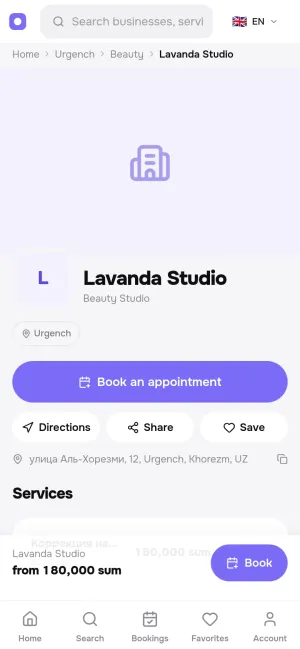
A place's page shows the address, opening hours, services with prices, photos and reviews. The main buttons:
- Book an appointment — book online;
- Directions — open the route in your maps app;
- Share — send the link to a friend;
- Save — add it to your favorites.
3. Book in three steps
Service
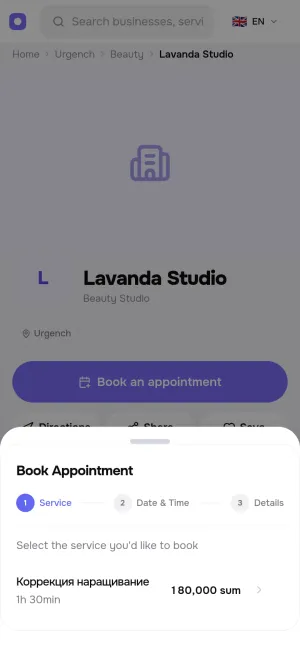
Tap Book an appointment and choose a service. Its length and price are shown next to it.
If the place has several branches, you choose the branch first.
Date & Time
Choose a day and a free time.
- Any Available — book with whoever is free first.
- Choose a Professional — book with a specific person. Free times are shown for each one.
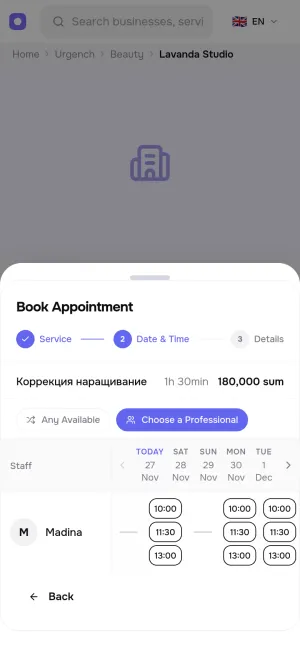
Everything taken? You can join the waitlist.
Details
- Enter your Full Name.
- Enter an Email or a Phone number — one is enough.
- Add a note under Notes (Optional) if you need to.
- Tap Confirm Booking.
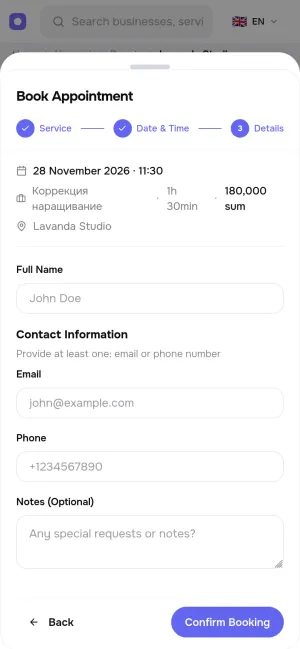
A Cloudflare check may flash at the bottom for a second. It passes on its own.
4. Confirm it's you
Before the booking reaches the place, Bronjoy asks you to confirm: a code by email, or one tap in Telegram. It takes less than a minute — see Booking confirmation code.
Once confirmed, the booking appears under Bookings. The confirmation and a reminder arrive by email or in Telegram. If the place confirms bookings by hand, you are notified when they accept it.
If a place has no online booking
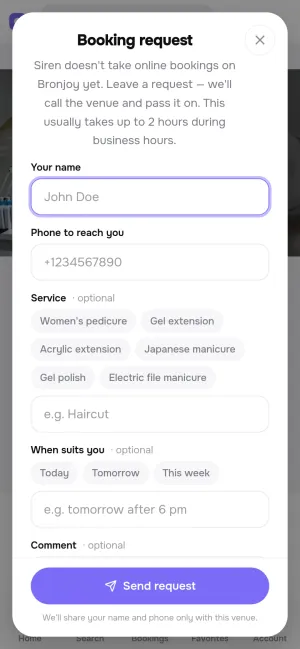
Not every place in the catalogue takes online bookings yet. Their page shows Request a booking and Call instead.
- Tap Request a booking.
- Enter your name and phone. A service and a time that suits you are optional.
- Tap Send request.
We call the place and pass your request on. This usually takes up to 2 hours during business hours. Only that place gets your name and phone.
Questions
Do I pay Bronjoy anything? No. Booking is free for clients. You pay for the service at the place, as usual.
Do I need to register? No. Your account is created at the confirmation step. Later bookings from the same device need no code.
Can I book for someone else? Yes. Enter the name of the person who is coming and your own contact details: the code and the reminder go there.
Can I book from Telegram? Yes, through the @bronjoy_bot bot — see Book in Telegram.
How to manage bookings from your phone
Bronjoy works in your phone's browser and inside Telegram. How to open the menu, confirm a booking and book a client from your smartphone.
Confirm your booking
Why Bronjoy asks you to confirm a booking, where the code arrives, how to confirm a phone number through Telegram without SMS, and what to do if no code comes.