
Booking confirmation code: email or Telegram
A booking reaches the place only after you confirm your contact. That way the place knows the booking is real, not a mistake or someone else's. Confirming is free and takes less than a minute.
What you see depends on the contact you entered at the Details step.
You entered an email
- An email with a 6-digit code arrives.
- Enter the code on the Confirm it's you screen.
- Tap Confirm & book.
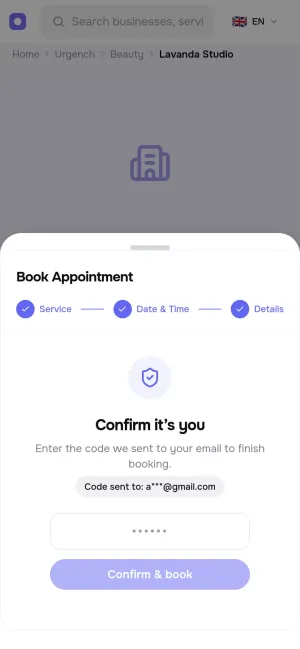
The code works for 5 minutes and for one booking.
You entered only a phone number
We don't send SMS. Your number is confirmed through our Telegram bot instead — for free.
- Tap Confirm via Telegram. The @bronjoy_bot bot opens.
- If Telegram asks, tap Start.
- Tap 📱 Share my number at the bottom of the chat and confirm.
- Go back to the booking page. You'll see "Number … confirmed — booking you in…", and the booking finishes by itself.
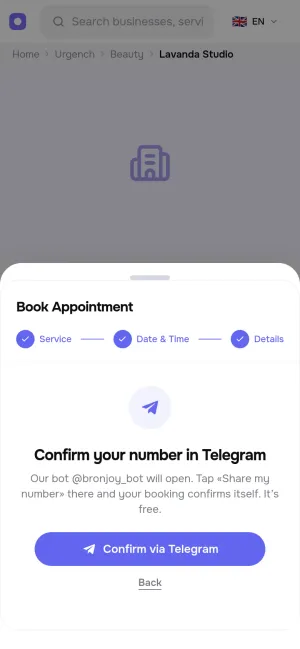
If you entered both a phone and an email, there is a Get a code by email link under the button — use whichever you prefer.
No code came
- Check Spam and Promotions. The email from Bronjoy arrives within a minute.
- Check the address. The screen shows where the code went: "Code sent to: …". If there's a typo, start the booking again with the right address.
- Get a new code. If the code never came or more than 5 minutes have passed, start the booking again — a new code is sent. The number of sends is limited, so don't retry many times in a row.
- Telegram timed out. If you see "The confirmation timed out", tap Confirm again.
When no code is needed
- You're signed in. After your first confirmed booking you stay signed in on that device, and later bookings go through without a code.
- You book in Telegram. In the @bronjoy_bot mini app Telegram already confirms who you are. You just tap Share my phone number — see Book in Telegram.
Find and book
Step by step: find a salon, barbershop, clinic or specialist on bronjoy.com and book online from your phone — free, no phone call needed.
Book in Telegram
Book a salon or clinic right inside Telegram with the @bronjoy_bot mini app — no code, no sign-up. Reminders and cancellation in the chat.